Mendix Pro for Mac: Mendix 10.7
Updated in December 2025
📖 Table of Contents
- ➤ Desenvolvimento de aplicativos Mendix: Estúdio Pro Mac beta
- ➤ Studio Pro Mac beta: light mode and dark mode
- ⚡ React Client – public beta
- ➤ Como Habilitar o Client React no Mendix ?
- ➤ Mendix: Atualizações de caixa de combinação
- ➤ Mendix: Manipuladores de eventos de fluxo de trabalho
- ➤ MendixChat Updates
O Mendix Studio Pro para Mac recebeu diversas atualizações desde o lançamento. Os passos de instalação e configuração apresentados continuam válidos para as versões mais recentes.
Precisa de ajuda com Mendix no Mac? [Entre em contato](/demonstracao-software-projetos/).
Mendix Studio Pro para Mac: Você já recuperou o fôlego depois do lançamento lotado do Mendix 10.6 MTS no mês passado? Bem, pronto ou não, este mês traz outro grande destaque que você vai querer conhecer – Studio Pro para Mac!
Mas isso não é tudo. Este mês, também apresentando o beta público do React Client junto com vários outros recursos que tornarão a vida de nossos usuários melhor, como: editabilidade condicional em visualizações de dados, atualizações de Combo-box, melhorias no MendixChat, atualizações poderosas do Mendix Connect, melhorias no portal e atualizações na nuvem.
Desenvolvimento de aplicativos Mendix: Estúdio Pro Mac beta
Usuários de Mac alegrem-se – a versão beta da versão para Mac do Studio Pro está aqui! Se você se lembra, inicialmente demonstrado no evento de lançamento do Mendix 10 em junho passado e temos o prazer de finalmente permitir que você experimente.
With Studio Pro on Mac, you can use the same features you're used to in the Windows version, including the ability to customize your template in the same way.
With true cross-platform functionality,the Mac version of Studio Pro runs just as smoothly as the Windows version and allows you to work directly with your Windows colleagues.
Getting Studio Pro to work on a Mac wasn't an easy task, and there are still many changes and improvements coming in the near future. In the meantime, you can try out the beta version:
Pro Mac Studio beta: light mode and dark mode


React Client – Public Beta
Mendix não apenas permite que você crie aplicativos de software com o mínimo de esforço, mas também permite que você crie aplicativos da web incríveis, aproveitando tecnologias modernas e preparadas para o futuro para fornecer a melhor experiência possível ao usuário.
Nesta versão, estamos oferecendo uma prévia de mais um marco para levar seus aplicativos Mendix para o próximo nível: o cliente React.
React has been around for a long time, but not everything has been converted to React, mainly to maintain backward compatibility with older widgets.
Ao habilitar o cliente React, você pode aproveitar todo o poder do React para sua aplicação Mendix. Fazer isso tem muitas vantagens. Mais notavelmente, ele melhora o desempenho de seus aplicativos, permite o carregamento incremental de páginas e prepara seu aplicativo para o futuro.

Loading without React Client

Loading with React Client
Como Habilitar o Client React no Mendix ?
You can enable the React client in your app's runtime settings.

Important:Not all modules and widgets supported by the platform have been converted yet, so we recommend using the React client only in new applications.
Nosso objetivo é lançar o cliente React como um recurso opcional para uso geral no Mendix 10.12. Para tornar a adoção do cliente React o mais simples possível, estamos trabalhando na conversão de conteúdo compatível com a plataforma e no fornecimento de funcionalidade para conversão de widgets.
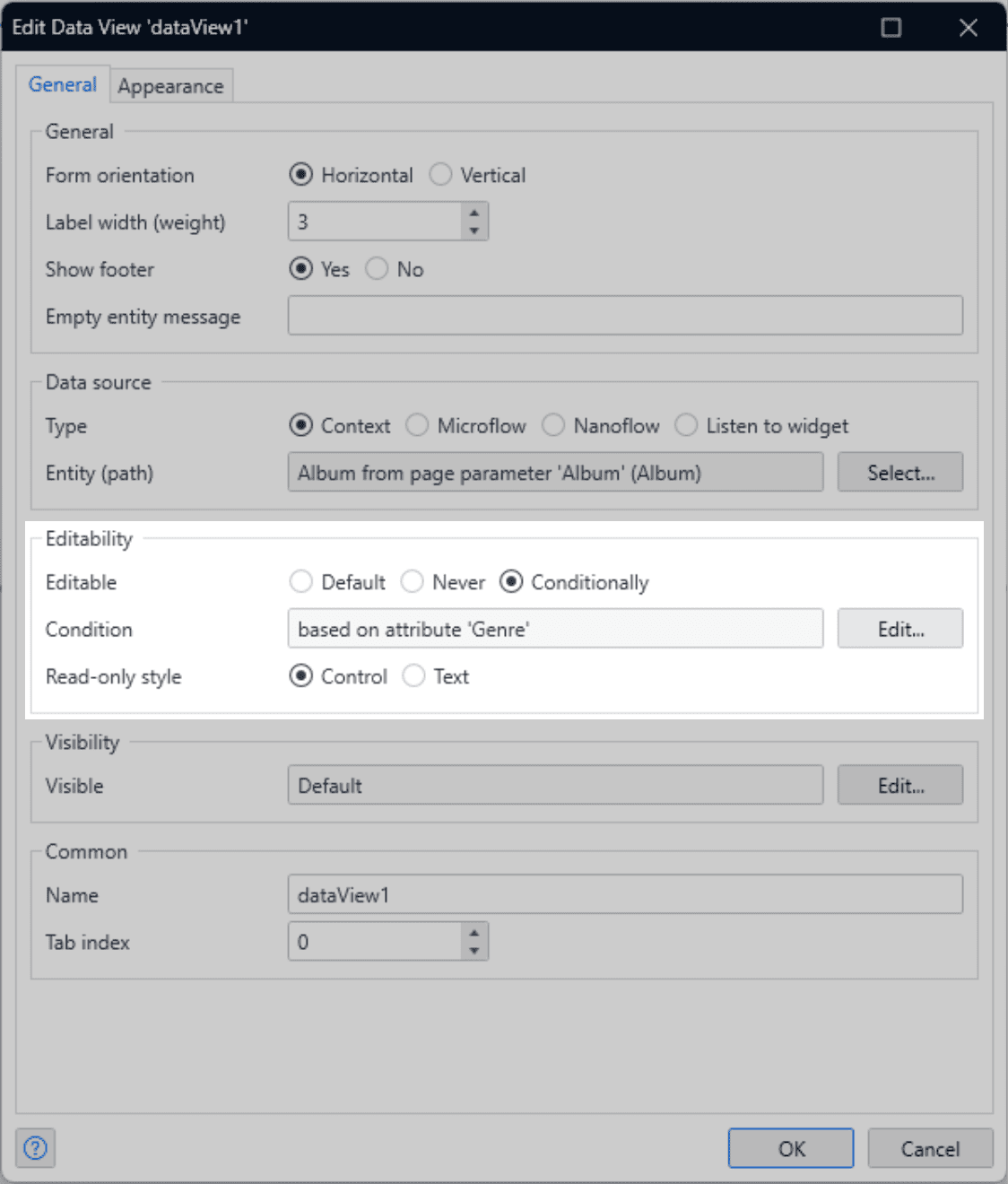
Conditional editability in data visualizations
Have you ever wanted to make multiple fields non-editable in a data view? Before this release, you had to configure this setting for each input widget individually, but not anymore! Now you can set conditional editability for all input widgets in a data view, making it faster and easier to maintain.
Mendix: Atualizações de caixa de combinação
The popular Combo Box widget already offered a great deal of out-of-the-box flexibility, such as custom content for its options. Now we’ve also added the ability to include a customizable footer. This can be used, for example, to add a button that links to the creation of new options, or simply to display information to the user.
In addition, we’ve added a “Select All” option that appears as a header and allows you to select all options when used with a set of references.
Mendix: Manipuladores de eventos de fluxo de trabalho
Audit trails, KPI dashboards, and process analytics have been taken to the next level with the new workflow event handlers. There are approximately 30 workflow events as the workflow execution progresses through the process definition.
The workflow data provided by these events can be used for a variety of purposes, such as building an audit trail, exporting to a BI system, or preparing data for use in diagrams, dashboards, reports, etc.
Various use cases can be implemented using multiple event handlers. Each event handler consists of a set of events relevant to that use case and a microflow that is triggered by each event occurrence.
Each event will contain a dataset. Event handlers can be defined at the application level, where each workflow will automatically use those event handlers, or you can define event handlers at the workflow level.
Previously, we had state change events for workflows that were only triggered when a state changed. State changes are now part of the new events and event handlers, so state change events are obsolete.

MendixChat Updates
Com o Mendix 10.6, lançamos a primeira versão beta pública do MendixChat , nosso assistente baseado em IA para fornecer respostas a perguntas comuns do Mendix.Â
Com o Mendix 10.7 foi aprimorado ainda mais o MendixChat. Agora você pode iniciar um novo tópico de bate-papo a qualquer momento, simplesmente digitando na barra superior. Também melhorado o uso de atalhos de teclado. A tecla ‘Enter’ agora envia a pergunta diretamente, enquanto a tecla ‘Control + Enter’ pode ser usada para adicionar uma nova linha à sua pergunta.
Além disso, foi adcionado informações úteis sobre as fontes nas respostas. Por exemplo, você pode ver a versão Mendix da documentação vinculada. Ou, se a fonte vier de um Caminho de aprendizagem da Academia, você verá informações sobre o nível de desenvolvedor Mendix necessário, etc.
Next to each item are icons we've added to make it easier to see where the information comes from.
MendixChat is currently in its early beta phase and isn't perfect. Expect some incorrect or incomplete responses. Send feedback directly from the chat interface and help us improve! You can use MendixChat in Studio Pro by opening it under View → MendixChat.
Leia mais sobre a tecnologia do client na Documentação Oficial do Mendix .
Confira essa e outras atualizações na Release Oficial Mendix
Keep exploring
📚 Want to learn more?
Confira nosso Guia Completo sobre Mendix para uma visão abrangente do tema.
Discover the power of Mendix