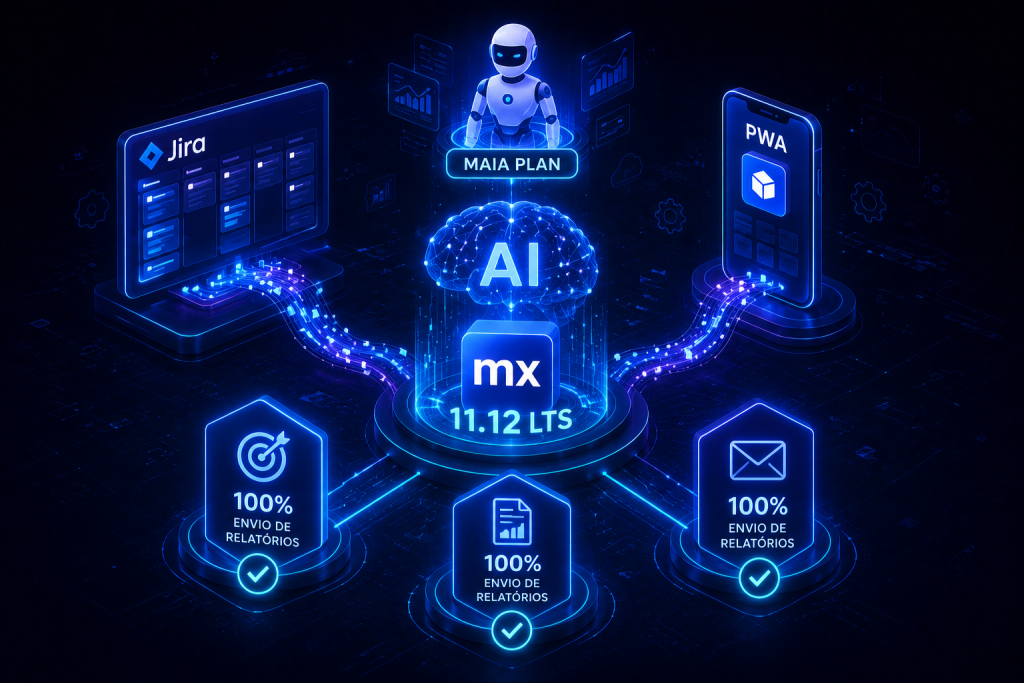
Maia integrado ao Jira permite que equipes levem ideias geradas por Maia Plan diretamente para o backlog do time, reduzindo transições entre ferramentas e acelerando o início da entrega. Com essa integração, épicos e user stories criados por Maia chegam ao Jira já agrupados por epic, prontos para priorização e planejamento de sprints.
Essa ligação entre Maia e Jira é configurada na etapa Start Development: basta escolher Jira como ferramenta de planejamento e conectar uma única vez os parâmetros do ambiente (URL, project key, board ID, conta e API token). A partir daí, o escopo completo gerado por Maia é empurrado para o backlog do projeto no Jira, e as histórias selecionadas para um sprint passam a estar disponíveis no Studio Pro, onde Maia Make pode dar sequência na implementação.
Maia integrado ao Jira: como funciona na prática
Ao optar por Jira como ferramenta de planejamento no fluxo Start Development, Maia Plan envia os artefatos de planejamento — épicos e user stories — diretamente para o backlog do projeto especificado. A intenção é eliminar a necessidade de alternar para o Mendix Planning Board quando o time já usa Jira para planejar, refinar e executar sprints.
O processo inclui uma única configuração inicial da conexão com Jira (ambiente, projeto, board e credenciais). Depois disso, o conteúdo gerado por Maia aparece no backlog do Jira agrupado por epic, permitindo que o time priorize e puxe histórias para o sprint de acordo com seu fluxo habitual. Quando uma história entra em um sprint ativo, ela fica disponível no Studio Pro para que Maia Make inicie a implementação baseada no escopo definido.
Configuração, fluxos e itens trocados entre Maia e Jira
A integração exige alguns parâmetros de conexão e envia um conjunto claro de itens ao Jira. A seguir, uma tabela com os elementos citados na documentação de Mendix 11.12 e o que cada um representa no fluxo de integração.
| Elemento | O que é | Função na integração |
|---|---|---|
| Environment URL | Endereço do ambiente Jira | Local para onde Maia envia o backlog gerado |
| Project key | Identificador do projeto no Jira | Define em qual projeto as histórias serão criadas |
| Board ID | Quadro usado para gerenciamento do backlog | Determina o backlog e o board onde os itens aparecem |
| Account | Conta usada para autenticação | Credencial associada às operações de criação no Jira |
| API token | Token de acesso para autenticação | Permite que Maia escreva épicos e histórias no backlog |
| Escopo enviado | Épicos e user stories gerados por Maia Plan | Conteúdo agrupado por epic e pronto para priorização |
Com esses elementos configurados, equipes que já trabalham em Jira mantêm seu fluxo de planejamento e ganham uma ponte direta entre geração de escopo (Maia Plan) e execução (Maia Make + Studio Pro).
Impactos na produtividade e boas práticas de uso
Integrar Maia ao Jira busca reduzir atritos no processo de planejamento e acelerar a transição do escopo para a implementação. Para tirar proveito efetivo da integração, considere práticas que favoreçam rastreabilidade e entrega contínua, mantendo o fluxo de trabalho do time no Jira enquanto se beneficia das capacidades de geração e detalhamento de Maia.
Mapeie oportunidades para evoluir sua operação de tecnologia.
Faça um diagnóstico com a TWRT para identificar melhorias em processos, governança, automação e performance operacional.
Além da integração com Jira, Maia Make traz recursos que complementam o ciclo de planejamento-execução e ajudam a manter qualidade e velocidade durante a implementação no Studio Pro.
- Permitir que módulos publiquem suas próprias skills, facilitando a reutilização de prompts e padrões entre aplicações.
- Colar imagens diretamente na conversa do Maia Make para fornecer contexto visual rápido sem passos intermediários.
- Usar o modo de planejamento, que faz Maia pedir perguntas de esclarecimento antes de gerar saídas quando o prompt é ambíguo.
- Adicionar documentos Markdown como contexto para conversas, ampliando os tipos de documentação que Maia pode utilizar.
- Configurar backends de modelo personalizados (Bring-your-own-LLM) para controlar custo, residência de dados e escolha de modelo sem perder integração com Maia.
- Comprar Maia Units com Cloud Tokens para estender consumo quando necessário.
- Pedir que Maia busque e instale módulos do Marketplace diretamente no projeto, reduzindo interrupções no fluxo de trabalho.
Esses pontos tornam Maia Make um complemento natural ao trabalho iniciado no Jira: enquanto Maia Plan gera o backlog no Jira, Maia Make pode trabalhar no Studio Pro com os itens priorizados, usando skills de módulos, documentos e recursos multimídia para produzir entregas mais completas e verificadas.
Fluxo recomendado entre Jira, Maia Plan e Maia Make
Um fluxo simples e alinhado com as capacidades descritas em Mendix 11.12 envolve etapas claras que preservam a cadência do time e permitem que Maia atue em diferentes papéis ao longo do ciclo:
- Escolher Jira como ferramenta de planejamento na etapa Start Development.
- Conectar os parâmetros do Jira uma única vez (Environment URL, project key, board ID, account e API token).
- Gerar escopo com Maia Plan; Maia empurra épicos e histórias para o backlog do Jira, agrupados por epic.
- Priorizar e puxar histórias para um sprint ativo no Jira conforme o fluxo do time.
- No Studio Pro, usar Maia Make para implementar as histórias selecionadas, aproveitando skills, suporte a documentos e testes automáticos.
Essa sequência mantém o time trabalhando no Jira enquanto a plataforma Mendix assume a geração de escopo, integração com o ambiente de desenvolvimento e apoio à implementação automatizada e orientada por conhecimento do projeto.
Maia integrado ao Jira reduz atrito entre planejamento e execução ao manter o backlog centralizado onde o time já opera, ao mesmo tempo em que preserva a capacidade de Maia Make de trabalhar dentro do Studio Pro com os itens priorizados. A integração exige configuração inicial das credenciais e parâmetros do Jira, mas, uma vez estabelecida, cria um caminho direto do conceito à entrega, com suporte complementar de skills, documentos e unidades de consumo para escalonar o uso conforme a necessidade.