Mendix 10.13 : Resumo Completo das Atualizações de Versão
Após o ótimo lançamento do MTS 10.12 no mês passado , o lançamento 10.13 deste mês foi projetado para capacitar desenvolvedores e melhorar a experiência geral do usuário em vários aspectos da plataforma Mendix.
📖 Table of Contents
- ➤ Pro Studio
- ➤ Improvements to the UI design
- ➤ Improvements for mobile devices
- ➤ Conexão Mendix
- ➤ AI
- ➤ Portal do desenvolvedor renomeado para Portal Mendix
- ➤ Governance
- ➤ Manual trigger
- ➤ Promote the deployment package stage
- ➤ Deep links for seamless collaboration
- ➤ Feedback loop
- ➤ Use case example
- ➤ OIDC Provider: Issuing a client credential
- ☀ Cloud
From enhanced performance in Studio Pro to the addition of new features—such as Maya Domain Model generation, improvements to UI Builder, mobile enhancements, AI features, Governance updates, OIDC Provider enhancements, and Cloud improvements—this release is packed with valuable additions.
Neste blog, exploraremos os principais destaques do Mendix 10.13, incluindo os novos recursos, melhorias e atualizações que elevarão sua experiência de desenvolvimento e permitirão que você crie aplicativos ainda melhores.
Pro Studio
Performance
We’ve improved performance in Studio Pro once again. The text editor is now much more responsive and provides immediate feedback, and copy-and-paste operations are also much faster. These improvements will allow developers to create apps even faster!
Maia: Domain Model Generation
Nesta versão, estamos estendendo o Mendix Maia com suporte para a geração de modelos de domínio. Após habilitar esse recurso experimental nas preferências do Studio Pro, você verá um botão Gerar modelo de domínio em um modelo de domínio vazio. Ao selecioná-lo, você pode descrever para o Maia quais dados deseja que seu modelo de domínio capture. Isso pode ser muito detalhado, por exemplo, “Criar uma entidade ‘A’, com atributo ‘B’ e ‘C’”, ou pode ser muito genérico, como “Preciso de um modelo de domínio para um aplicativo de registro de horas”. Com esta primeira versão, você pode usar o Maia para gerar o esqueleto para um novo modelo de domínio, que você pode refinar e concluir. Isso deve economizar um tempo considerável ao modelar um novo modelo de domínio, mas também ajudará você a considerar as entidades corretas para seu aplicativo.
Improvements in UI design
Combobox – Automatically populate the label and display the selection
The Combo Box widget has been updated with two improvements. First, the widget now automatically sets the label based on the selected attribute, simplifying the configuration process for developers. Additionally, we’ve added the ability to expose the selection. This means that the selected object can now be used directly for data visualizations, microflows, or nanoflows anywhere on the page, without needing to use non-persistent entities and associations. This provides developers with enhanced flexibility and control.
Data Grid 2 – Export Custom Content Columns
The Excel export feature of the Data Grid 2 widget has been improved. Previously, users encountered challenges when exporting data grid columns with custom content, as the default was to export the value “n/a.” In response to user feedback and a highly upvoted post on the Ideas Forum, we have introduced the ability to set a specific export value for custom content columns. This allows users to set a dynamic text value that accurately represents the data when exported, addressing previous limitations and ensuring a more consistent export process. Additionally, users now have the option to leave the export value blank, preventing the export of unnecessary data and maintaining the integrity of the Excel spreadsheet.
Improvements for mobile devices
Push notifications for Progressive Web Apps (PWAs)
Notificações push são um recurso muito procurado em aplicativos móveis, oferecendo uma linha direta de comunicação com seu público. Graças ao Push Notifications Connector da Mendix , integrar notificações push em aplicativos móveis nativos tem sido moleza. No entanto, notificações push não estavam disponíveis anteriormente para aplicativos da web progressivos (PWAs).
Boas notícias: notificações push agora também estão disponíveis para PWAs! O processo de configuração espelha o de aplicativos móveis nativos, garantindo uma experiência suave e familiar para aqueles já versados ​​no sistema.Â

As novas notificações push baseadas na web funcionam em PWAs em dispositivos iOS e Android e o módulo é compatível com Mendix 9.24 e versões superiores.
React Native Update
A Mendix está comprometida em fornecer tecnologia de ponta que garanta que seus aplicativos sejam confiáveis ​​e seguros. Para dispositivos móveis nativos, isso significa que atualizamos frequentemente nossas principais dependências, incluindo React Native e seus módulos associados, para aprimorar seus aplicativos móveis nativos.
In our latest release, React Native has been updated to version 0.73.8. This significant update improves compatibility with the latest Android and iOS operating systems and boosts JavaScript performance thanks to the integration of an updated Hermes engine.
Please note that a new version of Make it Native is required to take full advantage of these improvements.
Enhanced data recovery in offline-first applications
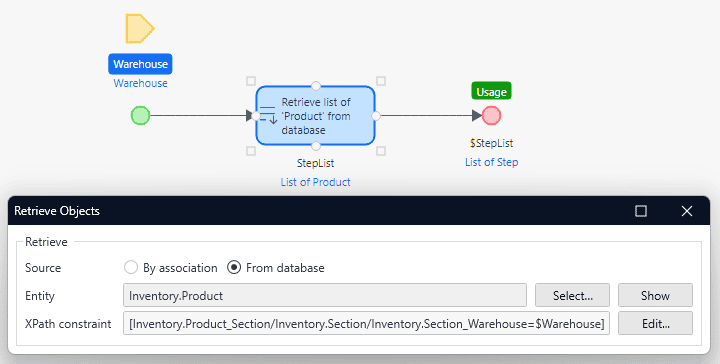
Filtrar objetos em várias associações é uma prática comum. Imagine um aplicativo de inventário que rastreia produtos em vários depósitos e seções. Embora exibir uma lista abrangente de todos os produtos em um depósito específico, incluindo todas as suas seções, seja fácil em aplicativos Mendix online, isso representa um desafio em um aplicativo que prioriza o offline.
With this release, we are introducing the ability to traverse one or more associations in data sources and Nanoflows for offline-first applications. This enhancement simplifies the retrieval of the right objects, especially within complex offline domain models.
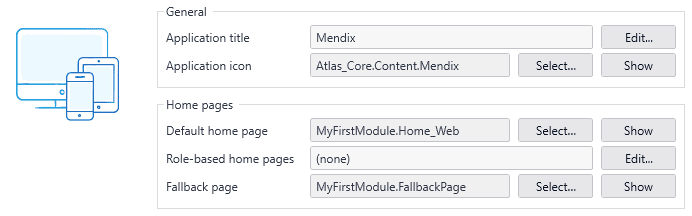
Fallback page for page/microcast URLs
O Mendix oferece flexibilidade aprimorada no gerenciamento de URL, permitindo que você personalize URLs personalizadas para acionar páginas ou microfluxos específicos. No passado, encontrar uma URL não reconhecida levaria a uma página de erro padrão.
But that’s a thing of the past! Now you have the power to designate a specific page or microflow to respond to these requests for unknown pages. It’s as simple as setting a fallback page within your navigation profile. For those seeking a more customized approach based on the accessed path, assign a microflow equipped with a ‘Path’ parameter. This update is designed to simplify your application modeling process, giving you the tools to build the applications you envision with greater ease and precision.
Conexão Mendix
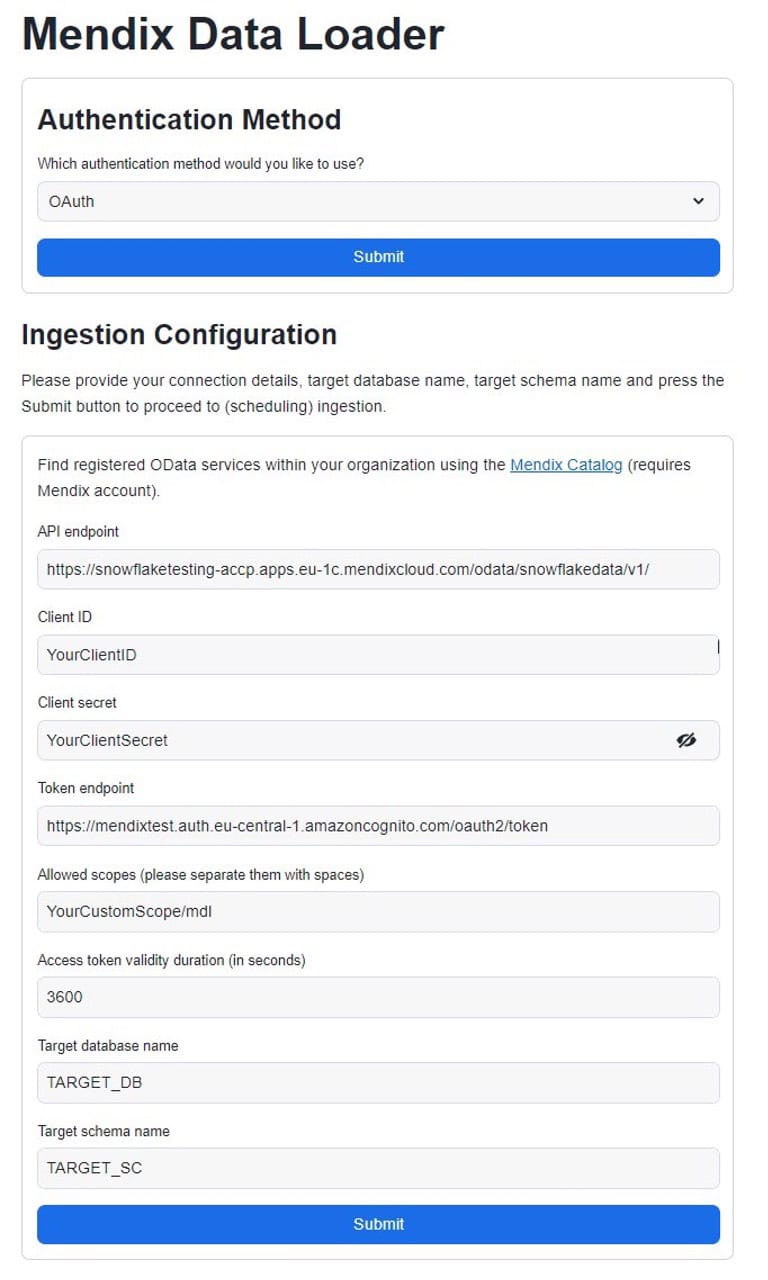
Snowflake: OAuth para o Mendix Data Loader
Com a atualização mais recente do Mendix Data Loader, os desenvolvedores podem usar OAuth como o tipo de autenticação. O Mendix Data Loader usa a estrutura de aplicativo nativa do Snowflake e foi projetado para simplificar a extração de dados operacionais de aplicativos Mendix diretamente no ambiente Snowflake. Diferentemente de nossos outros conectores Snowflake, o Mendix Data Loader está disponível no Snowflake Marketplace.
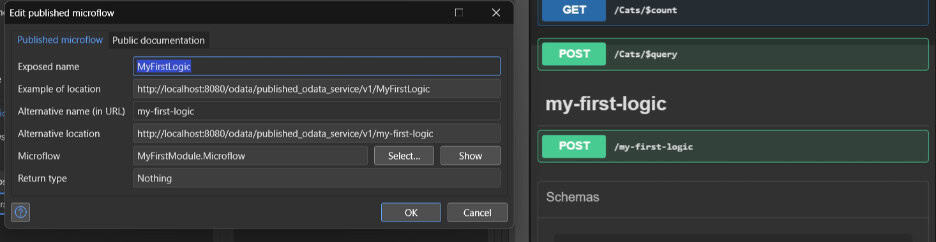
Endpoint Configuration for OData REST APIs
Some REST best practices and guidelines require that API endpoints use a specific naming convention. For example, all endpoints must use Kebab case. To ensure that your OData REST APIs comply with these guidelines, we now allow you to specify an alternative location for your endpoints in version 10.13.
AI
ChatCompletions with the Converse API within the Bedrock connector
ChatCompletions operations have been updated to use the Converse API, making it even easier to get started with your favorite conversation model. The Invoke model operations within ChatCompletions operations are replaced by a call to this new API, as it was designed specifically to create conversational applications that send and receive messages to and from any Amazon Bedrock conversation model.
We recommend using the new Converse API, as it provides a consistent experience, is easy to use, and makes it easier to “evaluate” different models within the context of the application. Depending on the model family itself, the following features are supported as an integrated experience: System prompts, Vision, and tool usage (function calls).
When new models or conversation families become available, they are automatically supported as part of this new Converse operation.
Image generation with Bedrock and OpenAI
Last month, we introduced a unified way to use text generation and chat responses with OpenAI’s GPT models, Anthropic’s Claude, and Amazon Titan from Bedrock. We’ve now introduced the same for image generation. You can now switch between DALL·E 2 and 3 in the OpenAI connector and Amazon Titan image generation in the Bedrock connector to easily compare the different images generated. Check out the OpenAI Showcase app for an implementation example.
Simplified embeddings and the PgVector knowledge base
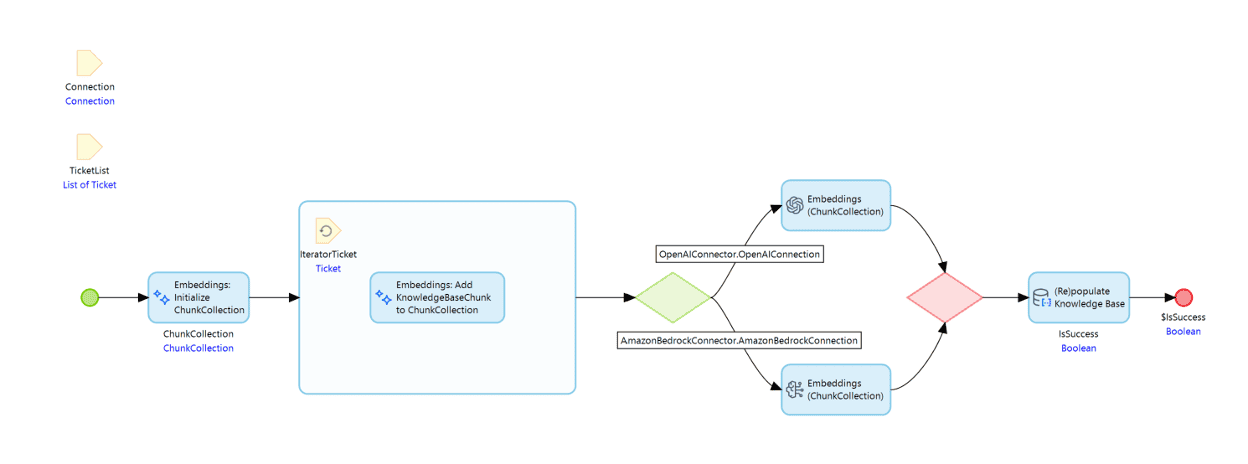
In the latest version of the Bedrock Connector and the OpenAI Connector, we’ve made it easier to create your own augmented retrieval configuration. Typically, you can take advantage of our out-of-the-box integration with hyperscale services, such as Amazon Bedrock Knowledge Bases, for use cases where you want to feed your own data into the large language model. Sometimes, however, this isn’t a good option, and you need a “do-it-yourself” solution. The PgVector Knowledge Base module does just that for you.
Com uma série simples de itens de caixa de ferramentas, agora você pode definir conhecimento relacionado a Objetos Mendix, gerar embeddings para ele e armazená-lo em sua base de conhecimento baseada em PgVector. Para isso, você pode usar os modelos Amazon Titan e Cohere Embeddings por meio do conector Bedrock ou os modelos text-embeddings do conector OpenAI. Na versão mais recente do aplicativo OpenAI Showcase, você pode ver como pode basear seu LLM em seus dados privados com uma configuração Retrieval Augmented Generation e como pode usar isso para fazer sugestões ao usuário com base em dados históricos.
Click here to send a message in the chat
We’ve implemented one of the most requested features in our Conversational UI module: press Enter to send, or Shift+Enter to start a new line. We’ve made it possible to align with the experience your users expect when interacting with any large language model in your conversational UI. This is also included in the AI Bot Starter App so you can get it right away when building your own private, enterprise-grade solution similar to ChatGPT.
Portal do desenvolvedor renomeado para Portal Mendix
Não estamos mais usando o nome “Developer Portal†e, em vez disso, o renomeamos como Mendix Portal. Sentimos que isso reflete melhor os recursos multifuncionais e multiusuários do Mendix Portal daqui para frente.
O Mendix Portal abrange todos os aspectos da nossa plataforma, incluindo atividades de desenvolvimento, como
- Apps
- Implementation
- peaks
- App Information
- Portfolio management
…as well as entities such as Marketplace, Governance in the Control Center, Academy, and Community.
This change aligns with our broader vision of supporting digital transformation, not just faster application development. We delayed this update until now to ensure a comprehensive approach, and we have updated all documentation accordingly.
Simplified "Create New App" workflow
Estamos felizes em anunciar o fluxo redesenhado para criar novos aplicativos no Portal Mendix, tornando o processo mais rápido e intuitivo do que nunca. Tudo o que você precisa fazer para criar um aplicativo é escolher um nome, escolher uma imagem (ou usar a gerada automaticamente) e selecionar um Starter App. Adicionar uma descrição é opcional, mas recomendamos fortemente que você faça isso para quaisquer aplicativos que outras pessoas da sua organização possam ter interesse em acessar.
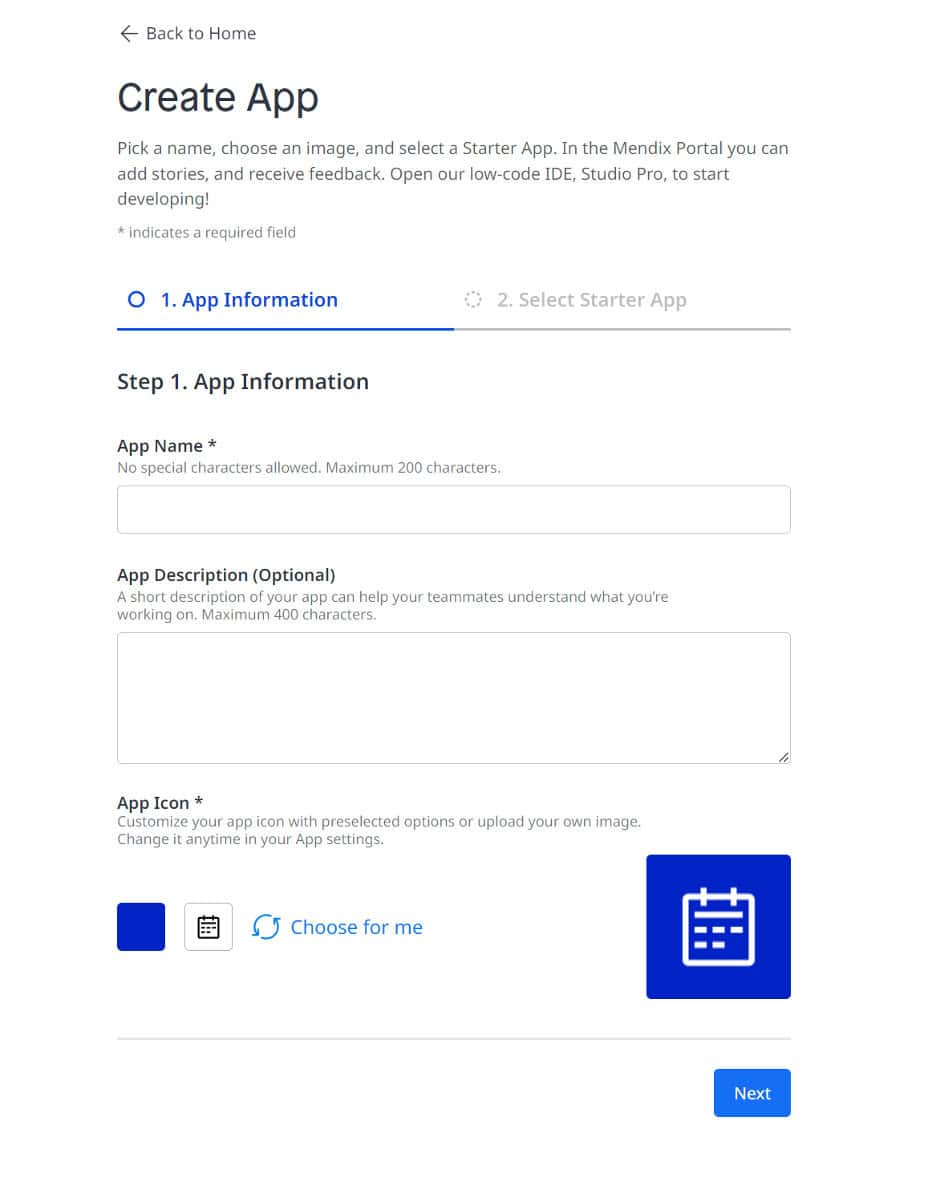
Now you can take advantage of a curated selection of Starter Apps to help you get started on your next app in Studio Pro. If your company has an official Starter App, it will appear at the top of the list. And if you’re looking for more inspiration, there’s also a wealth of Community Starter Apps to discover in the Marketplace!
No novo fluxo, você sempre criará um aplicativo na versão mais recente do Mendix. Se precisar criar um aplicativo em uma versão diferente, você pode fazer isso facilmente no Studio Pro ou no Marketplace.
Governance
Melhorias no Mendix Pipelines
O Mendix Pipelines potencializa o CI/CD low-code nativo da plataforma, ajudando você a automatizar o empacotamento e a implantação de software sem conhecimento de DevOps. Com um conjunto de etapas configuráveis, você pode projetar um pipeline no Mendix Portal para que ele seja acionado automaticamente com base em condições especificadas, como após um commit no TeamServer Git. à‰ isso. Sente-se e relaxe enquanto a automação com o Mendix Pipelines economiza horas de esforço. Atualmente, ele está disponível para uso ilimitado em beta público. Confira!
O Mendix Pipelines continua a evoluir. Aqui estão os principais recursos que trazemos com esta versão:
Manual trigger
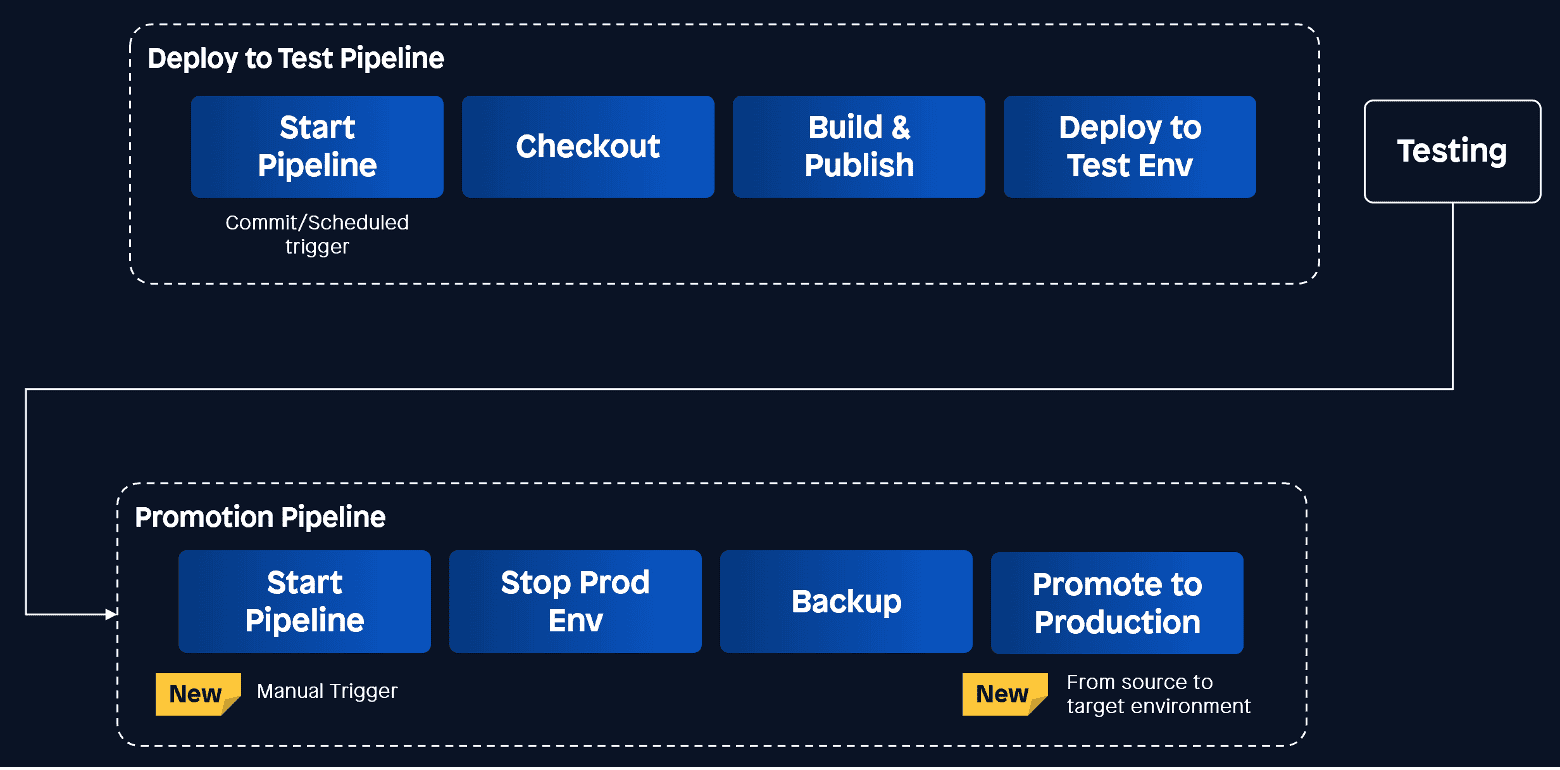
Deployments in higher-level environments, such as Acceptance and Production, typically begin with an explicit click after the release checklist is completed. To support these use cases, we have introduced a new trigger type—“Manual.”
Promote a phase of the implementation package
Once a deployment package has been tested in the test environment, it can be easily “promoted” to higher-level environments, such as acceptance or production, using the newly introduced “Promote Package” step.
Deep links for seamless collaboration
Have you ever wanted to share a specific pipeline run with a colleague to collaborate or debug? This is now even more seamlessly integrated with deep links to runs, run details, designs, and the configuration guide. The formats for these links are as follows:
- link/project/{projectid}/ is executed
- link/project/{project_id} /run/{run_id}
- link/project/{project-id} /Designs
- link/project/{projectid} /settings
Feedback loop
Try out the new features and let us know your thoughts using the Feedback widget on the right side of the screen on the Pipelines page. Your feedback helps us continuously improve our platform in ways that matter to you.
Use case example
Vamos pegar um caso de uso para ilustrar como usar esses recursos. Um fabricante de Mendix quer configurar os seguintes pipelines. Veja o vídeo abaixo para ver como você pode colocar isso em movimento em alguns minutos!
Stay tuned for more updates!
OIDC Provider: Issuance of Client Credentials
O mercado Mendix oferece módulos Single Sign-On (SSO) que fazem seu aplicativo Mendix delegar o login do usuário final para seu Identity Provider (IdP), como Entra Id, Okta, etc., mas em algumas organizações, configurar o SSO para cada aplicativo Mendix traz uma sobrecarga que é muito cara ou retarda a inovação. Nesses casos, um corretor SSO entre seu IdP e seu portfólio cada vez maior de aplicativos Mendix pode ser útil. Você pode criar um aplicativo Mendix que atue como um corretor SSO usando o módulo OIDC Provider que já está disponível para você no mercado Mendix.
Além disso, se você for um Independent Software Vendor (ISV), talvez queira criar uma solução multi-app que se comporte como um único app. Novamente, o módulo OIDC Provider ajuda você a fazer isso. Ao incluí-lo em um app Mendix central, esse app central pode atuar como um IdP para os outros apps. Os usuários finais da sua solução podem fazer login no seu app central usando credenciais locais e obter uma experiência SSO em todos os apps na sua solução multi-app sem usar um IdP ‘externo’.
So, what's new in the OIDC Provider module?
We have now enhanced the OIDC Provider module to support an additional use case: API consumption. API security can be configured to use API keys, but this is not a recommended security practice. If you prefer to use OAuth tokens (also known as bearer tokens or access tokens), you have two options.
- Use human identities. An end user of your application (a customer) logs in using SSO, and the client application can call the API on behalf of the end user using the OAuth access token it received as a result of the SSO process.
- Use a machine identity. Machine identities are also known as service accounts or application accounts. In this case, access tokens are used by the client application to consume the API on its own behalf. The end user is not relevant in this scenario.
The OIDC Provider now supports the so-called Client Credential grant. This means that a client application can obtain a “client access token” by authenticating with the OIDC Provider and presenting that access token to the API it is calling. The API can validate the token by performing token introspection on the IdP or by validating the signature.
What's next?
Stay tuned for the next release of the OIDC SSO module, which will include a ready-to-use microflow that allows your API to validate the client’s access token.
Cloud
No more irrelevant alert notifications
Para todos os aplicativos em execução no Mendix Cloud, registramos métricas. Isso inclui métricas de recursos, como uso de CPU e memória, mas também métricas de aplicativos, como usuários simultâneos e solicitações recebidas.
Com base nessas métricas, o Mendix Cloud dispara alertas. Se os valores de métricas cruzarem um limite específico, o status do alerta mudará. Os usuários que assinarem os alertas receberão uma notificação por e-mail, e as notificações de alerta também serão enviadas por webhooks.
Os limites de alerta para o Mendix Cloud eram os mesmos para todos os aplicativos, independentemente do plano de recursos de nuvem em que um aplicativo está sendo executado. Isso significa que alguns alertas, especificamente alertas relacionados a recursos, foram acionados com mais frequência em planos de recursos de nuvem menores, pois esses planos menores têm menos recursos e, portanto, usarão uma porcentagem maior dos recursos disponíveis mais rapidamente.
Analisamos os alertas enviados do Mendix Cloud e encontramos vários tipos de alertas onde poderíamos definir um limite diferente para planos de recursos de nuvem específicos. Com esses novos limites de alerta, o número de alertas irrelevantes para esses planos é reduzido significativamente. Os alertas agora são enviados apenas quando uma ação é necessária. Continuaremos analisando os alertas para ver se podemos fazer mais melhorias no futuro.
Keep exploring
Discover the power of Mendix