

Data Loader: Data Management in AdaptiveWork
In a world where efficiency and agility are crucial to business success, Data Loader emerges as an essential tool for optimizing data management in AdaptiveWork. By transforming the way companies collect, organize, and use information, this solution not only simplifies processes but also enhances strategic decision-making. In this article, we’ll explore how Data Loader can revolutionize your approach to data management, detailing its features, benefits, and best practices for integrating it into your workflow. Get ready to discover how this tool can be the key to superior performance and more effective data management!
AdaptiveWork Data Loader transforms the process of
Maximize your project management efficiency with AdaptiveWork's Data Loader! This powerful feature makes it easy to perform bulk data uploads, offering complete flexibility to modify, add, or even delete objects.
With Data Loader, you have complete control over your object attributes, allowing you to make bulk changes quickly and easily. Transform your data management process and optimize your workflow with this innovative solution!
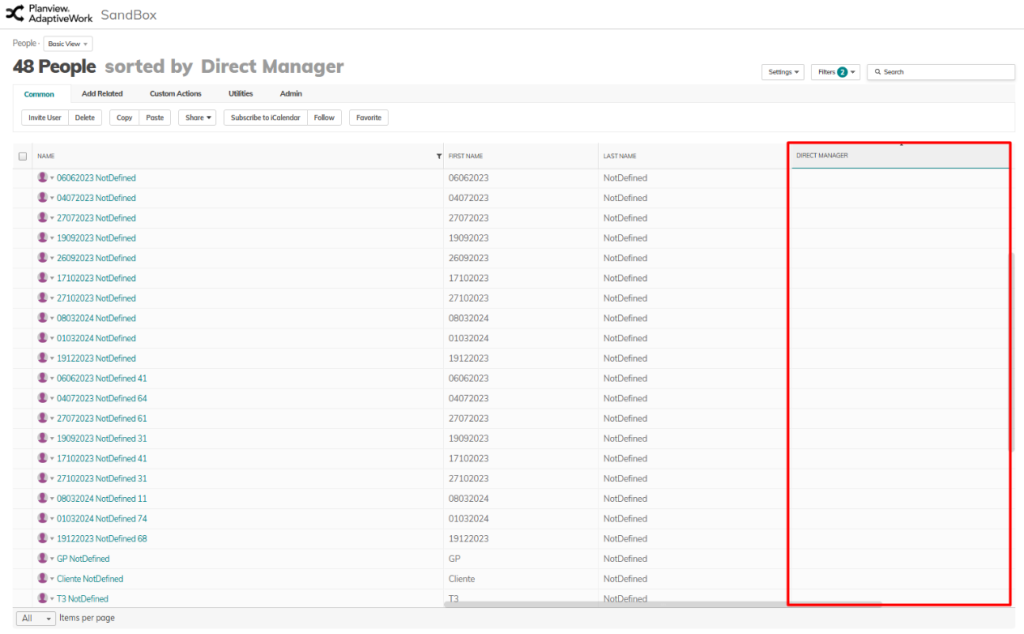
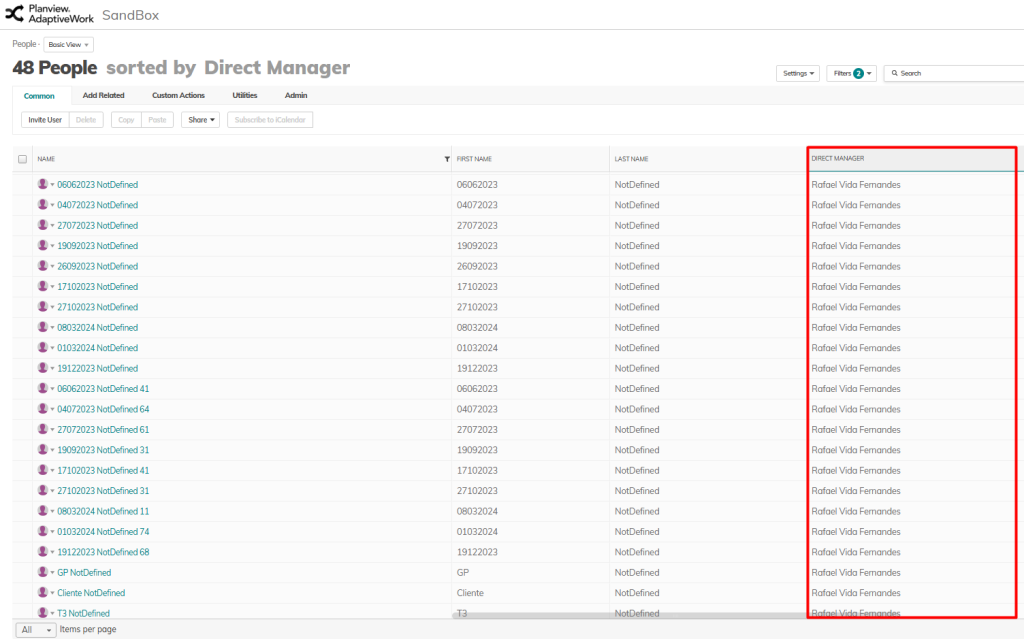
Imagine that your company has hundreds of users in the system, but many of them do not have a direct manager assigned. Updating these records individually would be an extremely labor-intensive and time-consuming task. However, with Data Loader, you can perform this registration in bulk and automatically , saving time and reducing human error. Instead of editing each record individually, the tool allows you to carry out the process quickly and efficiently, updating thousands of records at once.
Before Data Loader:
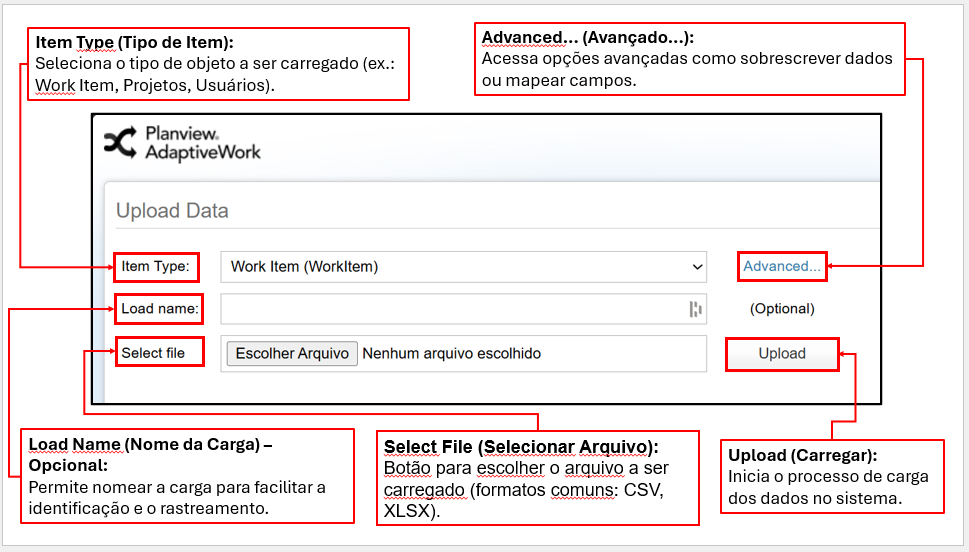
How does it work?
After the data loader:
Key Points:
Data Loader allows you to modify large volumes of data in key objects, such as projects, tasks, milestones, timesheets, and expenses. In addition to updating, deleting, or adding information to these core records, the tool enables adjustments to related objects, such as associations between projects and tasks, expense approvals, and links between time records and activities.
LIMITATIONS: Data Loader has a limit of 5,000 rows at a time, for both updates and deletions. It is important to split the data into smaller batches if the volume exceeds this limit to ensure the process runs efficiently.
Integration with Excel: The tool works in conjunction with Excel, allowing data to be prepared, manipulated, and organized in advance in spreadsheets. This facilitates data validation, record structuring, and bulk uploads with greater accuracy and speed.
AdaptiveWork’s Data Loader transforms the data management process by providing an agile, effective, and hassle-free solution. By automating bulk data loading and modification processes, companies can increase productivity, reduce operating costs, and improve data accuracy. In an increasingly data-driven world, tools like this are essential to ensuring that your company remains competitive and efficient.
🔗 External Reference: For more information, visit the Planview website.
Benefits
1. Data Management Efficiency
Data Loader enables the quick import and export of large volumes of data, significantly reducing the time spent on manual processes. For example, a company can update its customer database in minutes, rather than hours.
2. Error Reduction
By automating the data loading process, Data Loader minimizes the risk of human error, ensuring that the information is accurate and consistent. This is crucial in industries such as finance, where even a small error can have major consequences.
3. Simplified Integration
Data Loader simplifies the integration of data from different sources, enabling companies to consolidate information from various platforms into a single location. For example, sales, marketing, and customer service data can be integrated for a more comprehensive analysis.
4. Access to Valuable Insights
By using Data Loader, companies can quickly turn raw data into actionable insights. This enables teams to make informed decisions based on real-time analytics, improving agility and competitiveness in the marketplace.
5. Scalability
Data Loader is designed to grow alongside your business. As your data needs increase, the tool can be easily scaled to handle larger volumes, ensuring that you never fall behind in a dynamic business environment.
Use Cases
Data Loader in AdaptiveWork offers a variety of practical applications that can optimize data management in different contexts. Here are a few examples:
- Sales Data Integration: A sales team can use Data Loader to quickly import sales data from various sources, such as spreadsheets and CRM systems, enabling more efficient analysis and strategic planning based on up-to-date data.
- Inventory Updates: A retailer can use Data Loader to update its inventory database in real time. This ensures that data on available products is always accurate, improving the customer experience and preventing the sale of out-of-stock items.
- Performance Reports: A project manager can import team performance data via Data Loader, making it easier to create detailed reports that help identify areas for improvement and track goals.
- Financial Data Consolidation: Companies can use Data Loader to consolidate financial data from different departments, providing a comprehensive view of the organization’s financial health and facilitating strategic decision-making.
How to Implement Data Loader in AdaptiveWork
To optimize data management with Data Loader in AdaptiveWork, follow these practical steps:
- Planning: Before you begin, clearly define what data you need to load and for what purposes. Map out your data sources and determine how often they will be updated.
- Environment Setup: Log in to AdaptiveWork and navigate to the integration section. Make sure all necessary permissions are configured.
- Data Import: Use the Data Loader interface to import your data. Select the appropriate format (CSV, Excel, etc.) and follow the on-screen instructions.
- Validation: After importing, verify the integrity of the data. Run tests to ensure that the data has been loaded correctly and is accessible.
- Automation: Consider setting up schedules for automatic updates to ensure that your data is always up to date.
Practical Tips: Keep regular backups of your data and document each step of the process. This will make it easier to troubleshoot future issues.
Avoid the following mistakes: Do not ignore error messages during import, and avoid uploading duplicate data, which can compromise the analysis.
Now is the time to take action! Start implementing Data Loader and transform data management in your organization.
Best Practices
To optimize data management using Data Loader in AdaptiveWork, follow these recommendations:
- 1. Data Validation Before Import: Always validate your data before uploading it. This prevents errors and inconsistencies that could compromise data integrity in the system. Use validation tools to check formats and values.
- 2. Use of Standard Templates: Create and use standard templates for data import. This ensures that all data is loaded consistently, making maintenance and subsequent analysis easier.
- 3. Error Monitoring: Implement a monitoring system to identify and log errors during the upload process. This not only helps you resolve issues quickly but also provides insights into areas that need attention.
- 4. Team Training: Invest in ongoing training for your team on best practices for using Data Loader. A well-informed team is essential for maximizing efficiency and minimizing errors in the data management process.
- 5. Regular Data Backups: Perform regular data backups before carrying out any upload operations. This ensures that you can restore critical information in the event of failures or errors during the process.
Discover Planview solutions


