


Introduction to Planview Portfolios
In an increasingly dynamic business world, efficient project and resource management has become essential to the success of organizations. Planview Portfolios emerges as an innovative solution that promises to revolutionize the way companies manage their project portfolios. Imagine being able to view, prioritize, and optimize all your projects in one place, increasing efficiency and transparency in decision-making. In this article, we’ll explore the features of Planview Portfolios and how they can deliver significant benefits to your business—from improving strategic alignment to boosting productivity. Get ready to discover how this tool can transform your portfolio management and drive your results!
Planview Portfolios: Features That Will Bring Many
Planview Portfolios: Project management is a crucial and critical component for the success of any organization. Countless challenges can arise at any moment, causing many managers to face significant obstacles that can compromise the efficiency and results of their projects. Have you ever faced difficulties in project management that compromised deadlines, quality, and budget? Don’t let these problems hinder your projects! With the Planview Portfolios, you’ll have access to a variety of features that will bring many benefits to your business, including: project management, schedule planning, financial management, and portfolio scenarios.
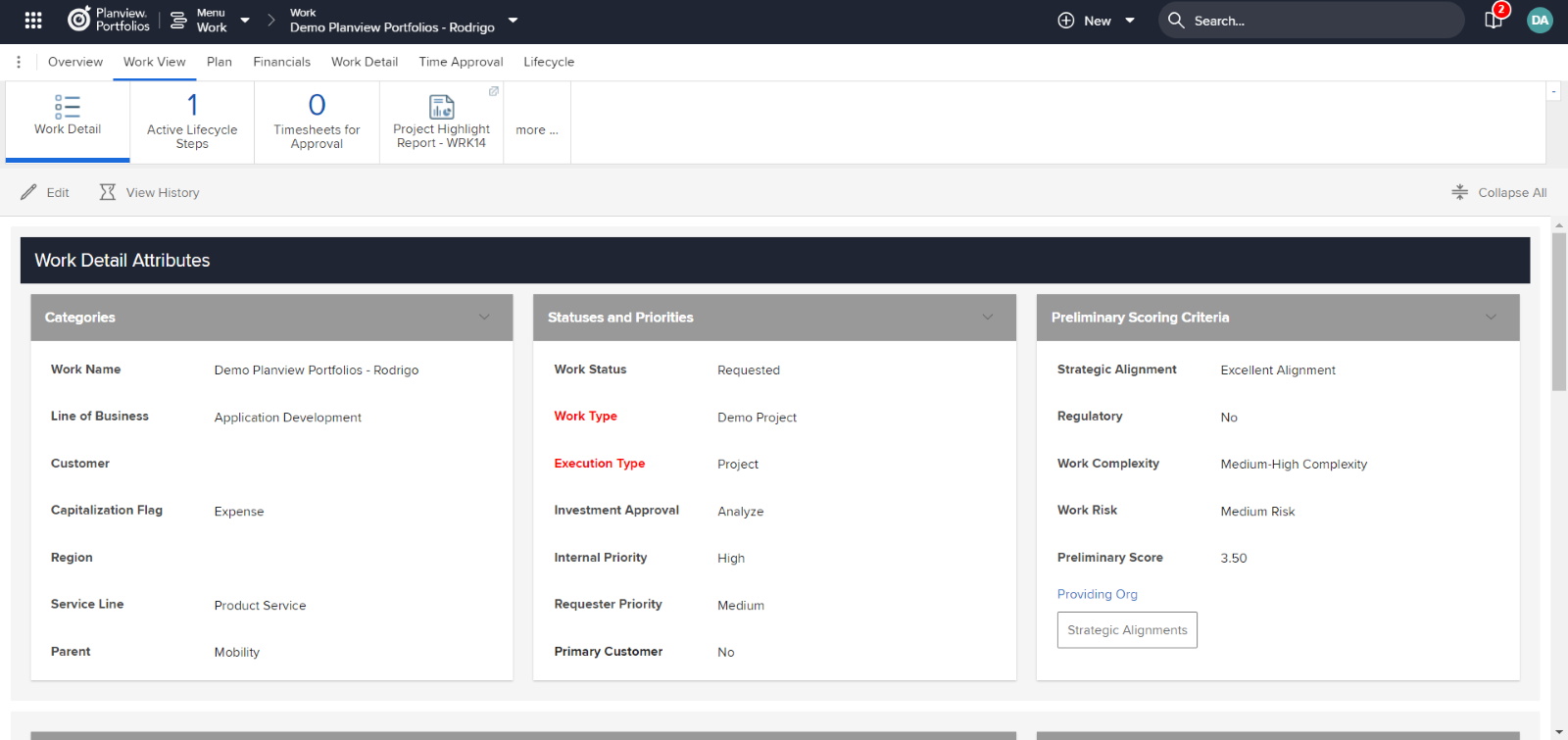
In project management, you can tailor how the system works to meet your business needs. The goal is to bring your workflow into the tool, where you can improve it whenever necessary.
Planview Portfolios: Note that in the project example below, we have a fully customizable details section:Â
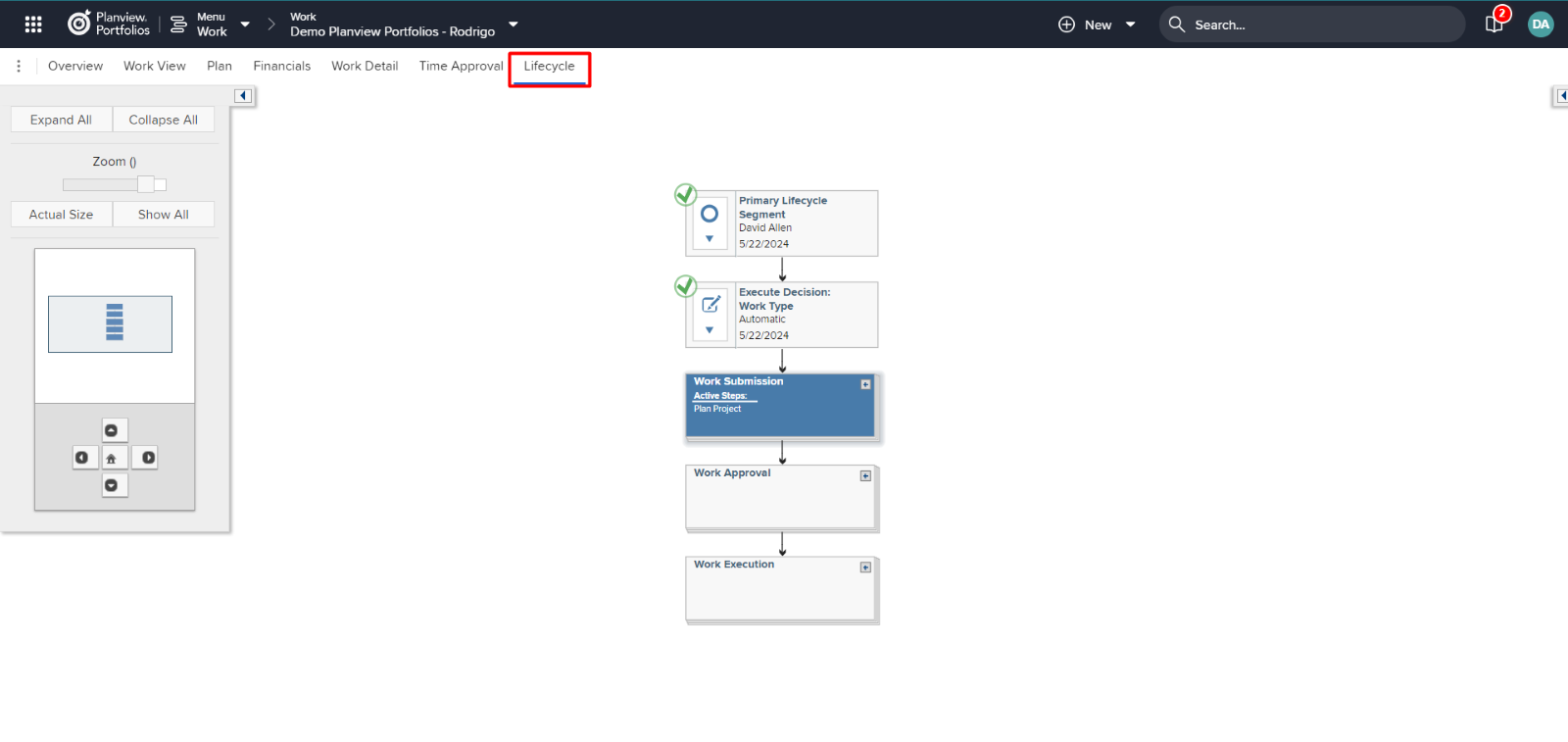
You can design your workflow using the lifecycle, where you can define action steps performed by other users, such as approvals and other manual or automatic actions:
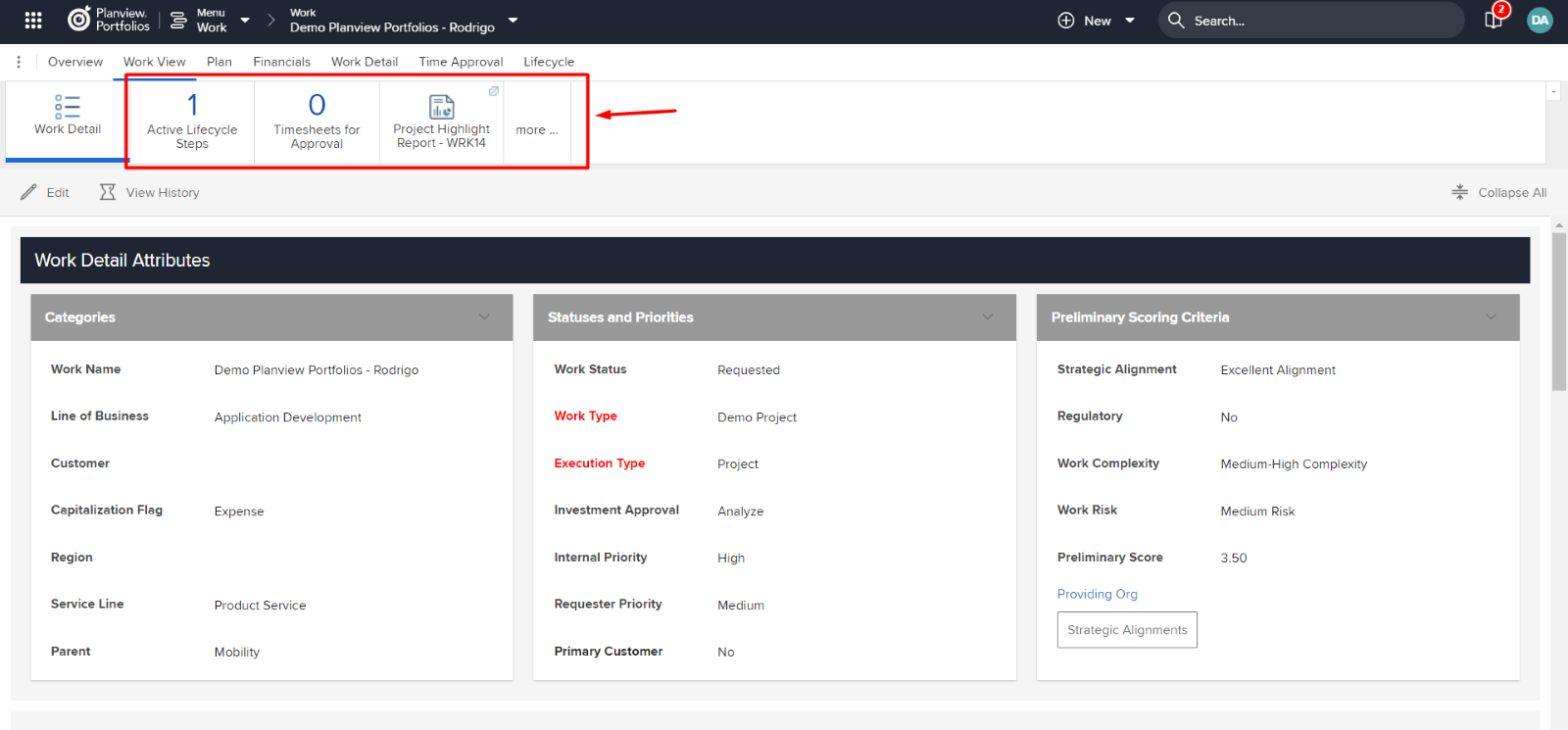
Another very practical feature that will help you in your day-to-day work is the ability to create fully customizable reports containing important information for the project:
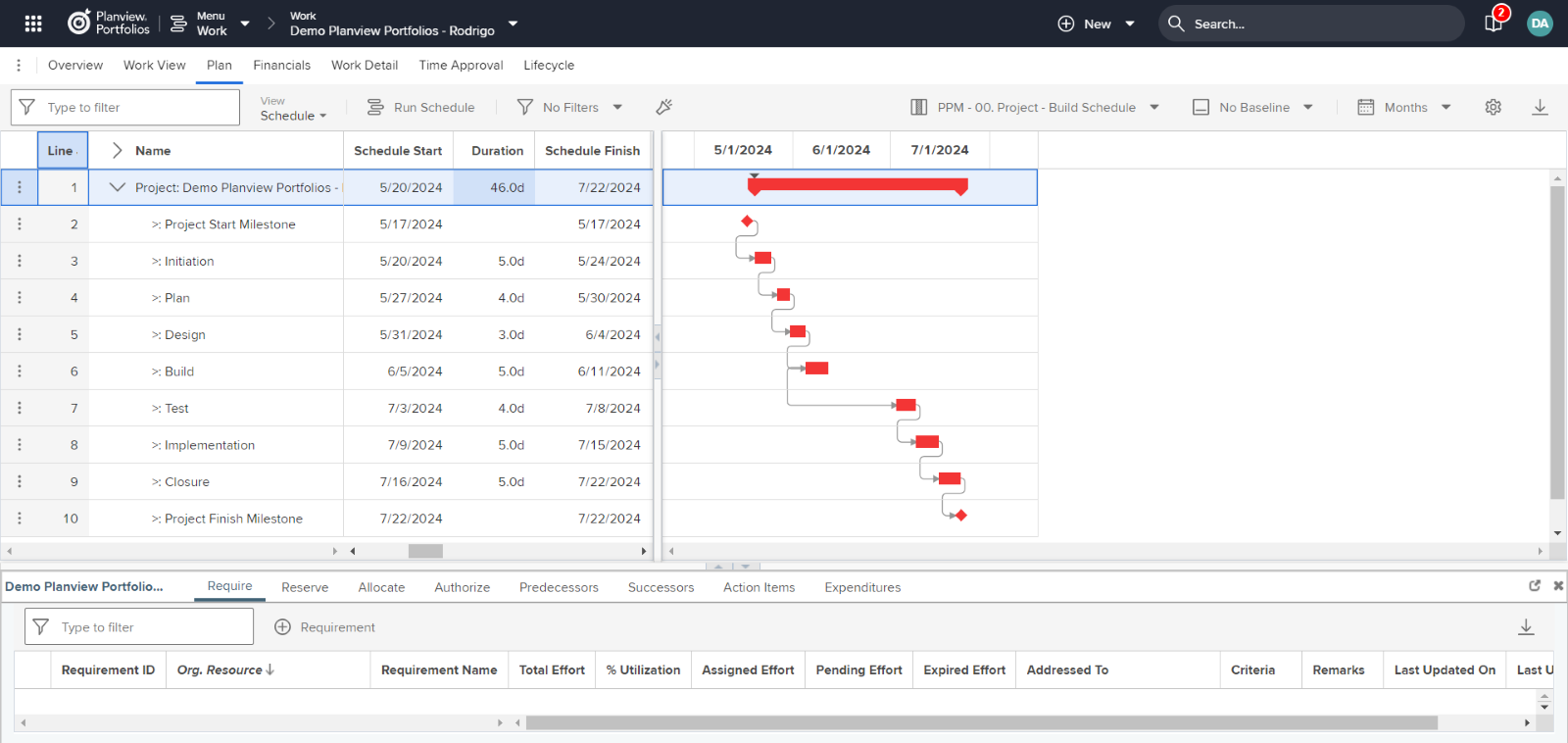
Within the project, you can set a schedule manually or create a ready-made schedule template to save time. In it, you can effectively organize all the tasks necessary for the project’s progress, set deadlines, manage resources and their workloads, identify potential workflow issues and improve them, as well as request resources for specific roles before the project begins, make resource reservations, and finalize allocations:
Below is an example of how to allocate a resource to an activity: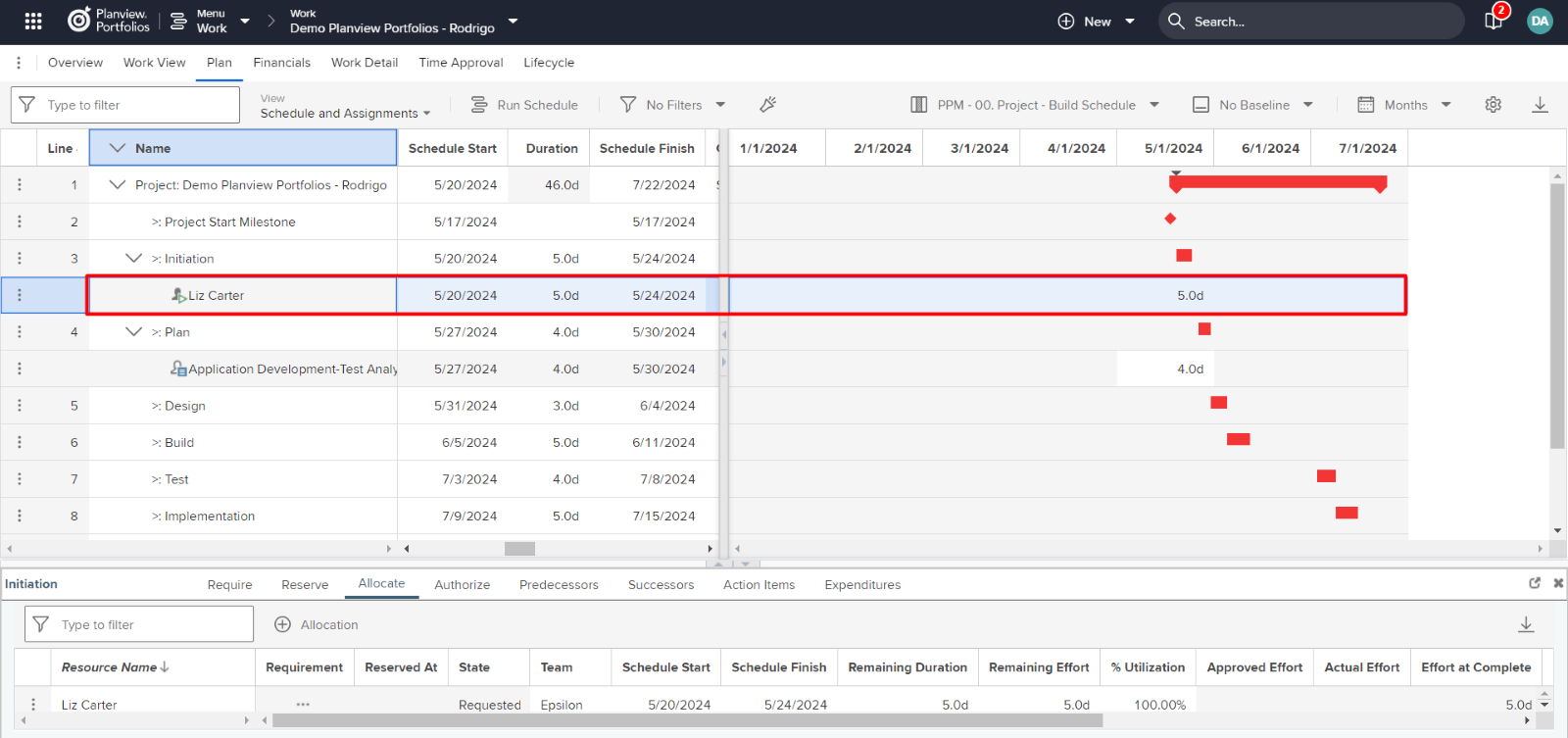
For this type of task, we have the resource manager role, who is responsible for managing resource portfolios within their area, always aiming to avoid conflicts with other activities involving the same resource in other projects; depending on the situation, another resource with the same capabilities but greater availability may be assigned instead.
Here are some examples from the perspective of a resource manager, where the allocation made for the project requires his or her validation and authorization:
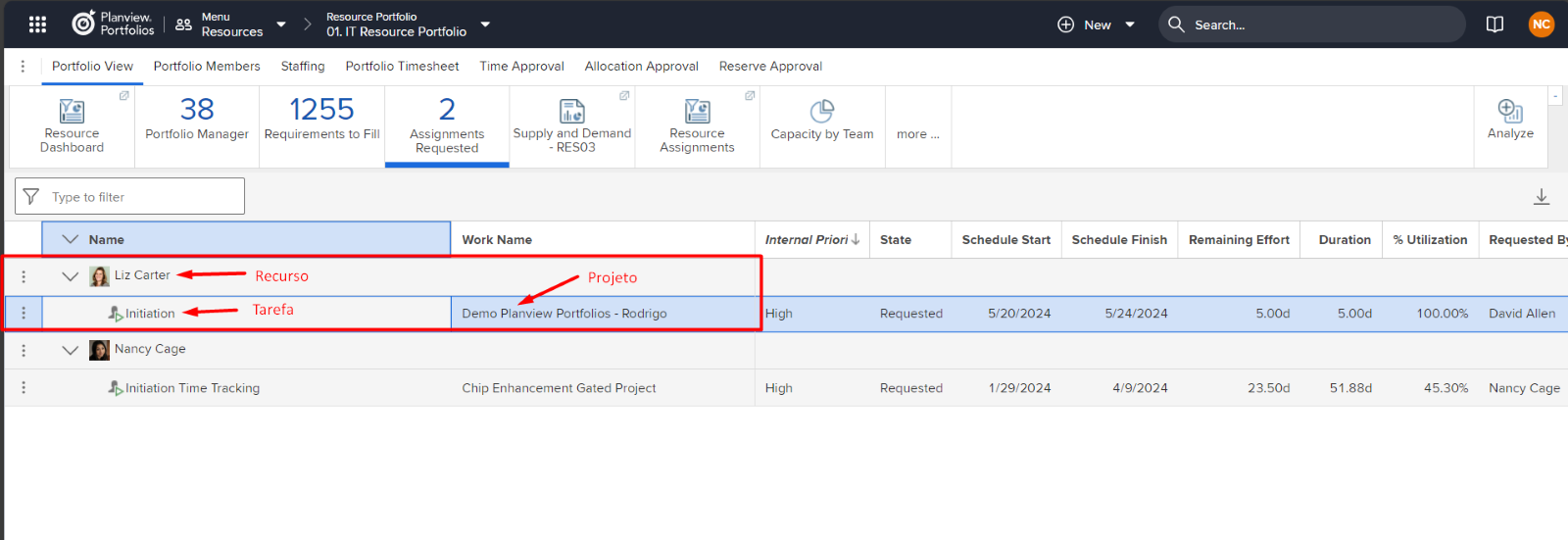
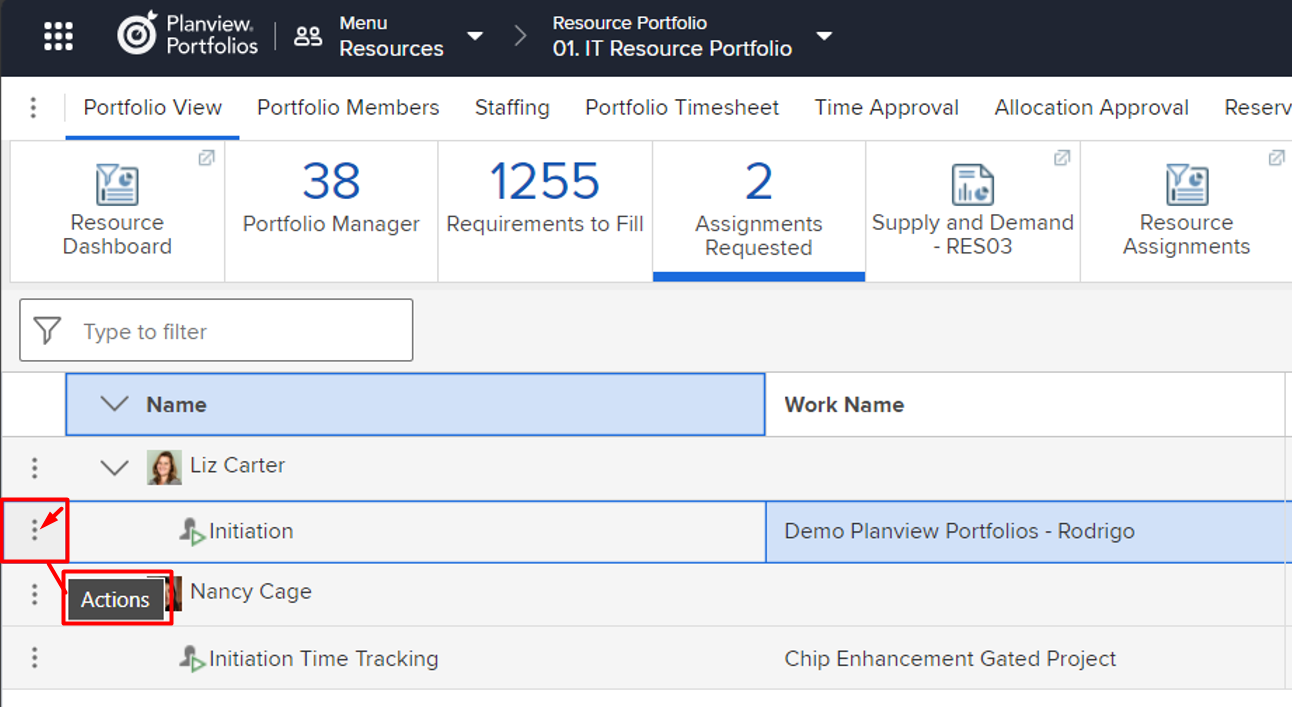
In the actions related to the allocation approval request, you can review the resource's availability and approve or reject the allocation:
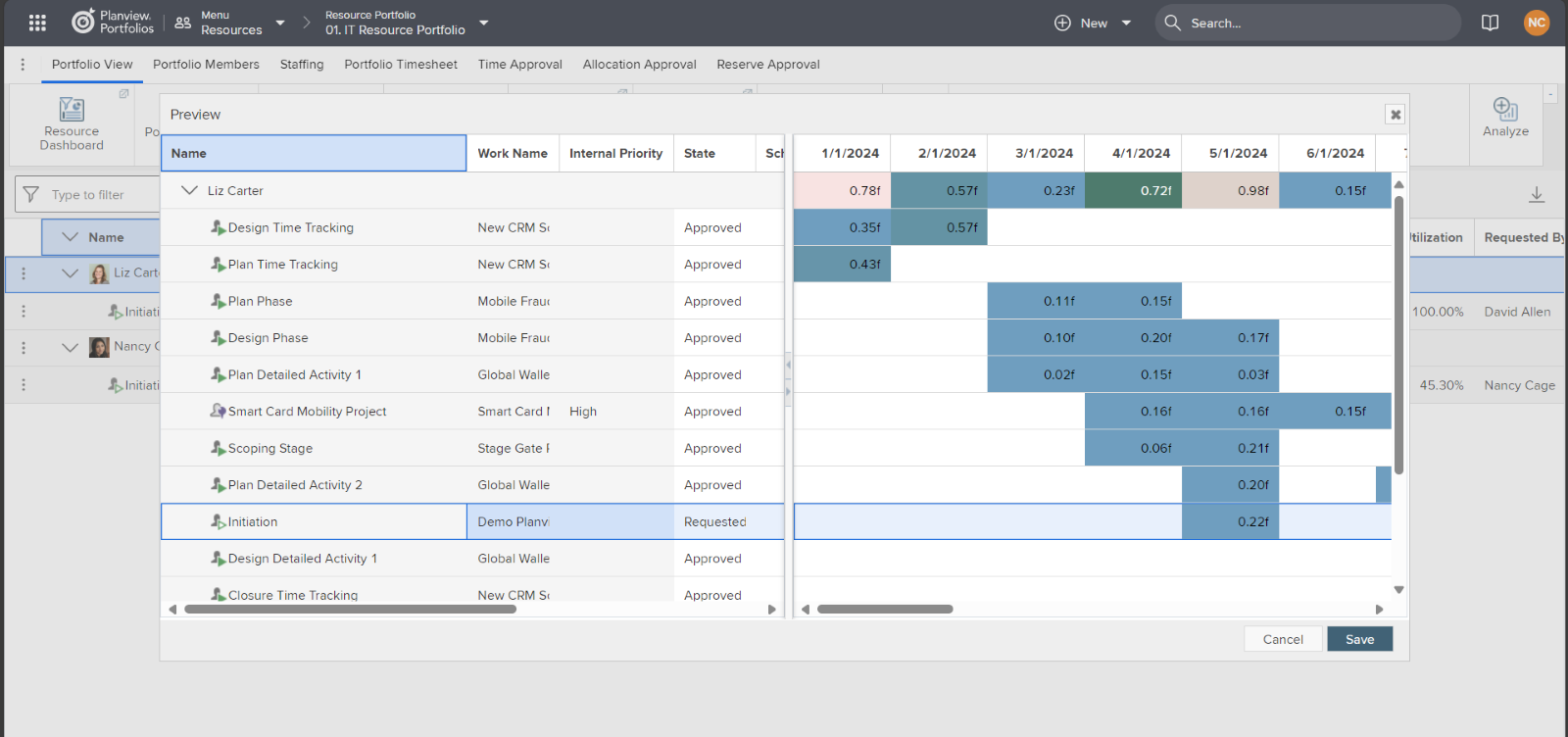
In the example below from the availability analysis screen, you can view all the tasks from other projects to which the resource is assigned, thereby avoiding overloading its capacity:
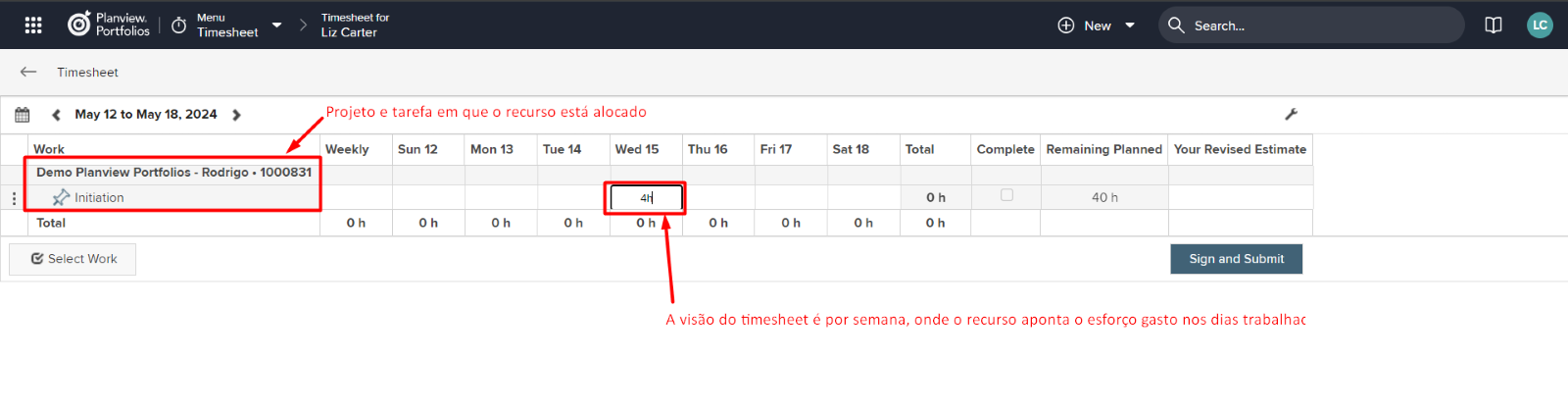
Once the resource allocation is approved, he can report the number of hours spent on tasks in his timesheets. Tracking hours can help identify time-consuming activities, enabling the restructuring of schedules and deadlines based on lessons learned. It can also serve as a cost control mechanism, where each resource has an hourly rate, allowing for the calculation of project or portfolio expenses:
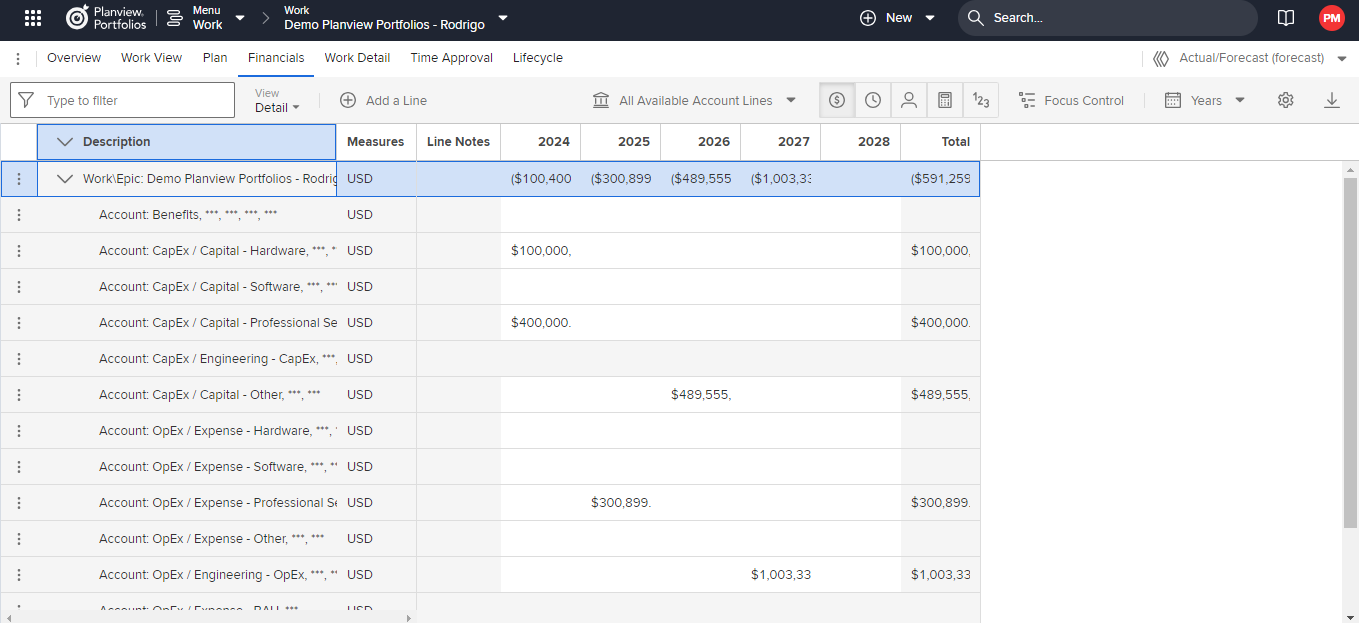
Moving on to the project’s financial plan, you have many options for breaking down all project expenses by account and analyzing current and projected costs. Over time, trends and changes may emerge. For this type of situation, you can create a secondary version of the financial plan to forecast trends and compare and predict their impacts:
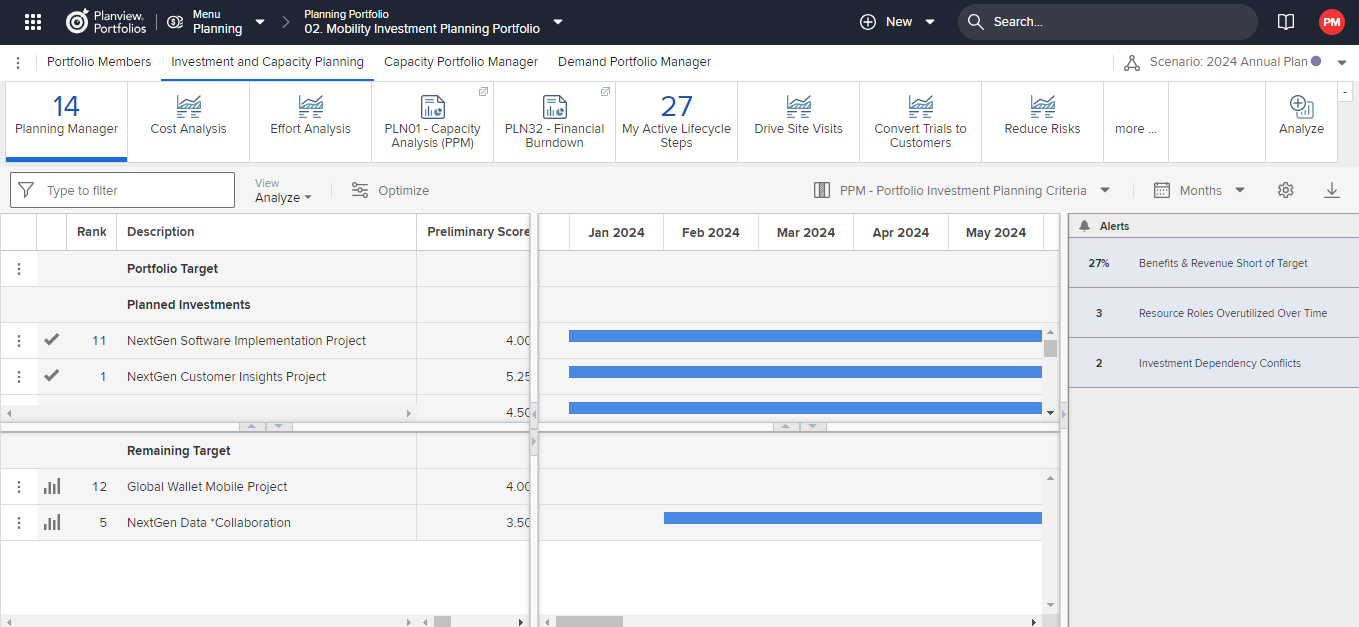
In the context of portfolios, you can simulate hypothetical scenarios using the Planning Portfolio to analyze the potential impacts that may occur whenever a new project is initiated. You can compare figures, resource capacity, and so on. It uses an alert system that flags problematic impacts. Changes made to these scenarios do not alter the actual figures:
📚 Want to learn more?
Check out our Complete Guide to Planview for a comprehensive overview of the topic.
How Planview Portfolios Works
Planview Portfolios is a tool designed to help companies manage their projects and resources efficiently. Here's how it works:
- Portfolio Planning: The platform allows you to create and organize different project portfolios, making it easier to visualize priorities and strategic objectives.
- Performance Tracking: With interactive dashboards, you can monitor project progress in real time and quickly identify projects that are behind schedule or over budget.
- Resource Management: Planview helps allocate resources effectively, ensuring that the right teams are available for the right projects and preventing overloads and waste.
- Custom Reports: The tool allows you to generate detailed reports, enabling you to analyze data and make informed decisions to optimize portfolio performance.
With these features, Planview Portfolios becomes an essential partner for your business's success.
Use Cases
Planview Portfolios offers a variety of features that can be applied in real-world scenarios, providing significant benefits to companies. Here are some practical examples:
- Real-Time Project Management: A technology company can use Planview Portfolios to monitor the progress of multiple projects simultaneously. This allows managers to quickly identify bottlenecks and reallocate resources efficiently.
- Strategic Alignment: A healthcare organization can use the Planview Portfolios to ensure that all projects are aligned with its strategic goals. By centralizing information, the organization can prioritize initiatives that maximize the positive impact on patient care.
- Custom Reports: A marketing company can use the reporting features in Planview Portfolios to create custom dashboards that show campaign performance in real time, facilitating quick and informed decisions.
- Resource Management: In a construction company, Planview Portfolios can help optimize the allocation of labor and materials, ensuring that projects are completed on time and within budget, while minimizing waste.
How to Implement Planview Portfolios
Implementing Planview Portfolios can transform your company's project management. Follow this step-by-step guide to ensure a smooth and effective transition.
- Set Clear Goals: Before you begin, identify the problems you want to solve and the benefits you hope to achieve with Planview Portfolios.
- Assemble an Implementation Team: Select key members from different departments to form a multidisciplinary team that will lead the implementation.
- Conduct Training: Invest time in training so that all users understand the features of Planview Portfolios. Use the available webinars and tutorials.
- Set Up the System: Customize the software to meet your organization's needs, such as creating project categories and defining metrics.
- Launch a Pilot Project: Start with a smaller project to test the system's functionality and fine-tune processes before a full implementation.
- Gathering Feedback: After the pilot project, gather feedback from the team to identify areas for improvement.
- Final Adjustments: Make the necessary corrections and prepare for large-scale implementation.
Practical Tips: Keep the lines of communication open and make sure everyone is aware of the changes. Use metrics to track progress.
Avoid Common Pitfalls: Don't neglect staff training and onboarding. Ignoring feedback can lead to future problems.
Now that you have a clear plan, start implementing Planview Portfolios and reap the benefits for your business!


